Back to Contents Page
Speaker Assembly
Dell™ Latitude™ D610 Service Manual
 Removing the Speaker Assembly
Installing the Speaker Assembly

|
CAUTION: Before you begin any of the procedures in this section, follow the safety instructions in the Product Information Guide. |

|
NOTICE: To avoid electrostatic discharge, ground yourself by using a wrist grounding strap or by periodically touching an unpainted metal surface (such as the back panel) on the computer. |
Removing the Speaker Assembly
- Follow the instructions in "Preparing to Work Inside the Computer."
- Remove the center control cover (see "Removing the Center Control Cover").
- Remove the keyboard (see "Removing the Keyboard").
- Remove the display assembly (see "Removing the Display Assembly").
- Remove the palm rest (see "Removing the Palm Rest").
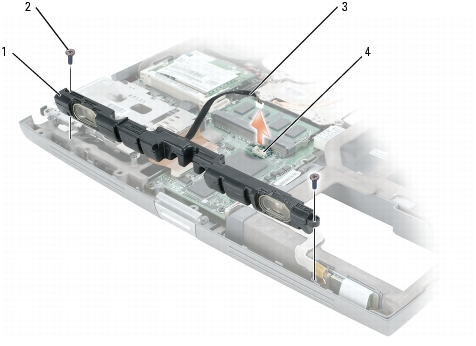
- Disconnect the speaker cable from the speaker connector on the system board.
|
|
NOTICE: Handle the speaker assembly with care to avoid damaging it. |
- Remove the two M2.5 x 5-mm screws (one on each side) from the speaker assembly.
- Remove the speaker assembly by pulling it straight up and out of the computer base.
|
1
|
speaker assembly
|
3
|
speaker cable
|
|
2
|
M2.5 x 5-mm screws (2)
|
4
|
speaker connector on system board
|
Installing the Speaker Assembly
- Slide the speaker assembly over the notch located in the center of the computer base.
- Replace the two M2.5 x 5-mm screws (one on each side) on the speaker assembly.
- Reconnect the speaker cable to the speaker connector on the system board.
Back to Contents Page