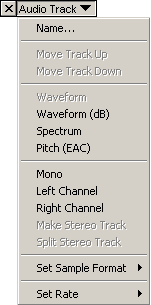
| Edit the name of the track |
| |
| Move Track Up or Down in the display |
| |
| Traditional display of audio material. It displays the amplitude of the audio over time. It is the default display mode. |
| Displays the frequency spectrum of the audio over time. |
| Tries to detect the pitch of the current audio and displays that information over time. |
| |
| Set playback of this single channel track on the left and right channels. |
| Set playback of this single channel track on the left channel. |
| Set playback of single channel track on the right channel. |
| The selected track and that beneath it is turned in to one stereo track. |
| Turn one stereo track in to two single channel tracks. |
| |
|
Pick the sample format for this track. The result is that all newly written data
is written in this format, no matter what format the original material was in. Newly written
data can be output by effect and generator plugins for example.
|
| |
| Set the sample rate of this track. Upon import, the track sample rate is set to that of the imported material.
A resampling feature is planned, so sounds of different sample rates can be combined in to one project. Right
now, if the audio sample rate is different to the project sample rate, you have to resample the audio before
importing it, so it plays at the correct speed in Audacity. |